Go Rogue! - Chapter 0
Setting Up

Cover image: By Thedarkb - Own work, CC BY-SA 4.0
An implementation of the Python Roguelike Tutorial from Roguelike Tutorials. #
Background #
I first did the roguelike tutorial about two years ago. I had somehow stumbled upon the r/roguelikedev subreddit and it was towards the end of that year’s Roguelikedev Does the Complete Roguelike Tutorial. I didn’t have any experience with Python, but I decided that I could figure it out as I went. I had played a few roguelike games and had been interested in learning Python. I just hadn’t got around to it yet. This seemed like a perfect project to motivate me.
I worked my way through the tutorial. I even extended my game a bit when I got to the end. I decided that I wanted to get a better understanding of Python, so I did the HarvardX CS50p course. I enjoyed that as well and started to try a few little projects with the language. I had a few things that I wanted to automate for my job and I thought that Python would work quite nicely, so I continued tinkering with it. Then I came across boot.dev. It was around Thanksgiving and they had their course discounted for a Black Friday sale, so I signed up for that. It’s a great course and I would definitely recommend it to anyone interested in learning a bit about programming, or if you are like me and just wanted to knock the rust off your programming skills. Boot.dev does approximately the first half of their course in Python, but the second half is primarily in Go.
Learning Go was a ton of fun and so this year, when the Roguelikedev Does the Complete Roguelike Tutorial event rolled around, I thought that I might participate, but try doing it in Go. Unfortunately, I got a bit busy with various other things and just didn’t quite get around to it. Now, I have decided that I would like to make some time for it and to encourage me to see it through to completion, I thought that I would start a blog about STEM related topics. I have a fair amount of projects in various stages of completion. Hopefully, writing about them will help encourage me to increase the amount of them that get to a completion!
Incidentally, this is the second time I have started this blog. I originally setup this site to document building an 8-bit breadboard computer based on a 6502 processor using the kit and tutorial video series from Ben Eater. Hopefully this time it will stick. Maybe I will even get back around to finishing that project.
Prior Knowledge #
This tutorial assumes general familiarity with core programming concepts—variables, data types, control structures, loops, and functions—though not necessarily Go. If you have those fundamentals down, you will follow along without trouble.
Here is a quick 30-second primer on how Go works:
Packages & Entry Point: Code is organized into packages. All Go files in the same directory must share the same package name. An executable program starts in package
mainwith a parameterless, non-returningmain()function.Encapsulation: Visibility is controlled entirely by capitalization rather than keywords like public or private. Identifiers starting with an uppercase letter are exported (visible outside the package); lowercase identifiers are unexported (package-private).
Structs & Receivers: Data models rely on
structtypes and composition rather than class inheritance. Functions attached to a struct use a receiver:Value receiver: The method operates on a copy of the struct.
Pointer receiver: The method operates directly on the underlying struct in memory, allowing mutations.
Implicit Interfaces: An
interfacedefines method signatures. Any concrete type that implements those signatures satisfies the interface automatically—there is no implements keyword.Variables & Scoping: Variables must be declared prior to used. Variables are declared using the keyword
varor the short declaration operator:=. Go is block-scoped and permits shadowing. It is a compile-time error to declare a local variable inside a function without using it; package-scoped variables (declared outside any function or method) are not required to be used within the package.Strongly, Statically Typed: Go does not perform implicit type conversion, even between numeric types like
intandfloat64. The exception is untyped literal constants. For example,var f float64 = 2is legal because the literal 2 adapts to the target type. However, mixing typed variables directly—such asmyInt * myFloatis a compile-time error. You must explicitly convert the type:float64(myInt) * myFloat.Functions: Functions can take pointers or values, and can return multiple values natively. This is commonly used for
(result, error)patterns.
Installing Go #
The first thing that you will need in order to follow along with this tutorial is an installation of Go.
Go is available from Go.dev. It is available for Windows, Mac, and Linux. I will be using Linux, but there shouldn’t be any problems if you are on one of the other two platforms, as everything I will be using is available on all three.
Installing Visual Studio Code #
You don’t have to use Visual Studio Code as your editor, any text editor will do. However, I like vs code and so it’s the editor I will use. You can download it from Visual Studio Code. It is also available for Windows, Mac, and Linux. There are a few extensions for it that provide some nice Go support. I would recommend the official Go extension from the Go Team at Google.
Installing Ebitengine #
The official Roguelike Tutorial uses Python and python-tcod. There is a Go wrapper for libtcod, but it hasn’t been updated in 6 years, whereas python-tcod’s most recent update was 6 days ago. I guess that would work fine if I wanted to make sure I used a version of Go and of libtcod that matched that wrapper, but I decided to go ahead and use Ebitengine, as it seems to be the most popular 2d engine for Go. This does mean that there will be a bit of extra work in my version of the tutorial. The python-tcod has built-in support for things like calculating lines of sight and path finding, and probably some other things that I am not thinking of at the moment. This means we will be building those as part of this tutorial as well.
Installation instructions for Ebitengine are available here. As with everything else in this tutorial, it is available for Windows, Mac, and Linux.
Note for Linux Users: Unlike Windows and macOS, running Ebitengine on Linux requires development libraries for graphics (OpenGL/X11) and audio (ALSA). On Debian/Ubuntu-based distributions, install them before running the project:
sudo apt install libc6-dev libgl1-mesa-dev libxcursor-dev libxi-dev libxinerama-dev libxrandr-dev libxxf86vm-dev libasound2-dev pkg-config(For Fedora, Arch, or other distributions, refer to the official install guide.)
Installing Git #
This part is strictly optional, but it is a good idea to use a version control system. It can save you a lot of headaches when working on projects and combined with a service like GitHub provides a remotely accessible backup for your projects. Git is available for Windows, Mac, and Linux and is available to download from Git. Learning to effectively use Git is too big of a subject for this tutorial, but we can get by with just using a few commands. If you are using vs code for your editor, it can integrate nicely with both git and github. There are some nice extensions that are built in and they can be accessed from the source control panel.
Ready to Go! #
Once you have your environment set up, you are ready to Go Rogue!
If you prefer to jump straight to the working baseline instead of setting up the files by hand, you can clone the repository and checkout the
chapter-0branch or thev0.0.0tag:git clone https://github.com/FooWho/go-rogue.git cd go-rogue git checkout v0.0.0 go run .This checkouts the exact “Hello World!” project state and runs the project.
Let’s first create a “Hello World” Go application to verify everything.
I like to start my projects by creating an empty project in Github. This lets me generate a default .gitignore file, creates a README file to fill out, select a license if I want, and makes it easy to link my local repository with the remote.
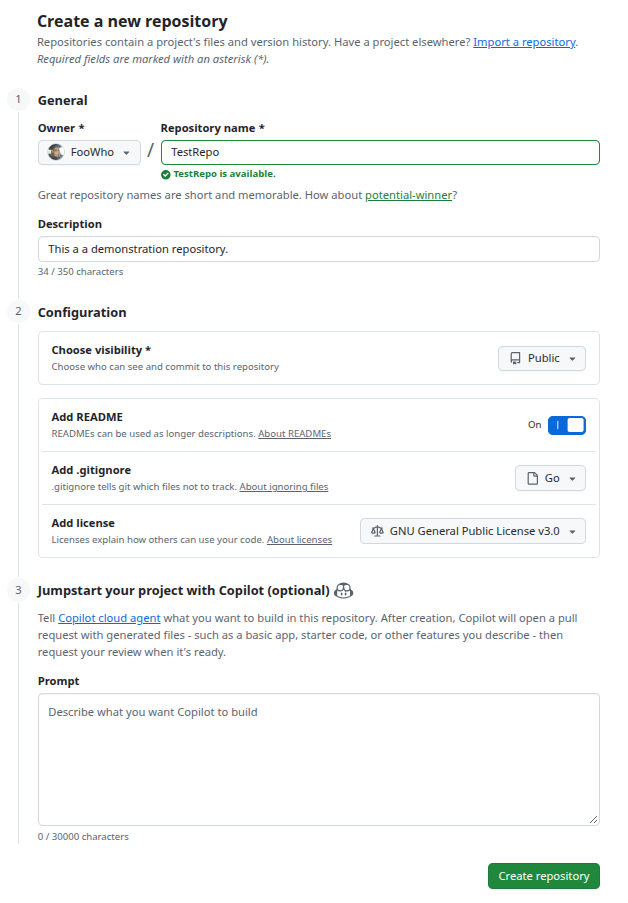
Now, in vs code, you can select to “Clone a Git Repository” and select the repository you just created on Github. You will need to link you Github account with vs code, but the interface will walk you through that process, or see the instructions located here.
This will create a directory to work in, initialize the git repository, and pull down the README file, LICENSE file, and .gitignore file. It will also associate the local repository with the remote.
Next we need to setup our Go environment. Every Go project has a go.mod file to track dependencies and to identify the module. The convention that I use to name my projects is github.com/[GitHub Username]/[Project Name]. So for this project, I will name it github.com/FooWho/go-rogue. The command to setup this up would be
go mod init github.com/FooWho/go-rogue
Replace github.com/FooWho/go-rogue with whatever you named your project and it will create a go.mod file for you that will look like this:
module github.com/FooWho/go-rogue

go 1.27.1
Now, we can create our main.go file and put some very basic boiler plate in it to make sure everything will work and to take advantage of Go’s package management system to pull down the Ebitengine modules. Here is what your main.go file should look like:
package main

import (
	"log"

	"github.com/hajimehoshi/ebiten/v2"
	"github.com/hajimehoshi/ebiten/v2/ebitenutil"
)

type Game struct{}

func (g *Game) Update() error {
	return nil
}

func (g *Game) Draw(screen *ebiten.Image) {
	ebitenutil.DebugPrint(screen, "Hello, World!")
}

func (g *Game) Layout(outsideWidth, outsideHeight int) (screenWidth, screenHeight int) {
	return 320, 240
}

func main() {
	ebiten.SetWindowSize(640, 480)
	ebiten.SetWindowTitle("Hello, World!")
	if err := ebiten.RunGame(&Game{}); err != nil {
		log.Fatal(err)
	}
}
To quickly explain what is going on here, Ebitengine requires that we implement the ebiten.Game interface. This interface has three required methods. We need to have:
type Game interface {
    func (g *Game) Update() error
    func (g *Game) Draw(screen *ebiten.Image)
    func (g *Game) Layout(outsideWidth, outsideHeight int) (screenWidth, screenHeight int)
}
The Update() method is called via the ebiten.RunGame() loop 60 times per second. This is where we can update the state of our game and prepare for the next step. In the next step, the ebiten.RunGame() loop will call our Draw() method. Here is where we have our rendering logic. Finally, we need to have Layout() which provides a mapping from the logical size of the window to the physical size of the window. Our “Hello World” application has an empty Update() method because have no game state to update yet, so we just return nil to indicate there were no errors in the update. Our Draw() method uses the ebitenutil.DebugPrint() method to write, “Hello, World!” to the screen. Finally, our Layout() method says that our logical window size is 320x240. In the main() method, we setup a 640x480 physical window (which Ebitengine is going to handle mapping to our virtual resolution of 320x240). We put a title on the window, and then kick off the ebiten.RunGame() loop.
We can now run the go mod tidy command and the Go package manager will update our go.mod file to indicate that we need to use the Ebitengine package and other packages that it relies on. My go.mod file looks like this now, but yours could be slightly different. The main thing is to verify that the line require github.com/hajimehoshi/ebiten/v2 v2.10.5 has the v2 at the end of the library name. There is an older v1 of the library. It is not compatible and we want to make sure not to download that version:
module github.com/FooWho/go-rogue

go 1.27.1

require github.com/hajimehoshi/ebiten/v2 v2.10.5

require (
	github.com/ebitengine/gomobile v0.0.0-20260820040257-d11f821a26a6 // indirect
	github.com/ebitengine/hideconsole v1.0.0 // indirect
	github.com/ebitengine/purego v0.11.0 // indirect
	golang.org/x/sync v0.22.0 // indirect
	golang.org/x/sys v0.47.0 // indirect
)
This command will also create a new file, go.sum. This file contains signatures of the libraries we are importing to ensure that they are authentic and have not been tampered with.
We should be able to run the application now and get a very simple “Hello World!” application using Ebitengine. The command to perform a temporary build and run our application is:
go run .
This will take a second to compile the first time and it might download some additional libraries, but it will be much faster in subsequent executions. The result should look like this: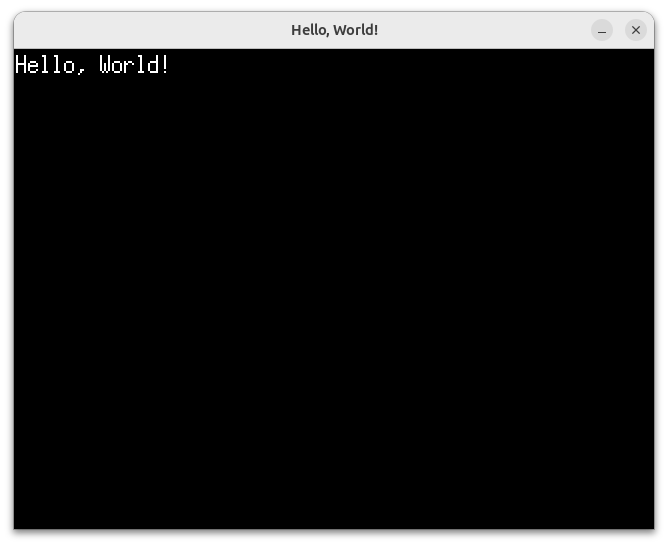
If you are using git and making your own repository, now would be a good time to commit your changes.
git add .
git commit -m "Chapter 0 - Setting Up"
Now we are ready to get started in earnest!
This tutorial is going to follow the same roadmap for features as the original Python/tcod tutorial:
- Part 1 - Drawing the ‘@’ symbol and moving it around
- Part 2 - The generic Entity, the render functions, and the map
- Part 3 - Generating a dungeon
- Part 4 - Field of view
- Part 5 - Placing enemies and kicking them (harmlessly)
- Part 6 - Doing (and taking) some damage
- Part 7 - Creating the Interface
- Part 8 - Items and Inventory
- Part 9 - Ranged Scrolls and Targeting
- Part 10 - Saving and loading
- Part 11 - Delving into the Dungeon
- Part 12 - Increasing Difficulty
- Part 13 - Gearing up
Some of the chapters in this tutorial will include a bit of a detour that I might break up into an aside, depending on the complexity. For example, we will need to implement pathfinding and line of sight, since Ebitengine doesn’t provide that functionality the way tcod does.